
Lightpanda Browser
The headless browser built from scratch for AI agents and automation.
Not a Chromium fork. Not a WebKit patch. A new browser, written in Zig.




Benchmarks
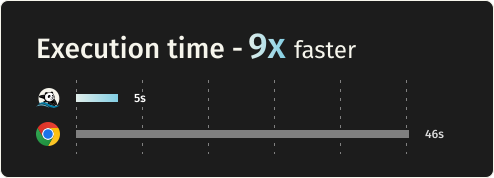
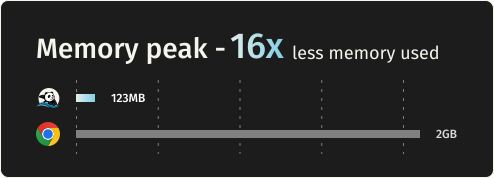
Requesting 933 real web pages over the network on a AWS EC2 m5.large instance. See benchmark details.
| Metric | Lightpanda | Headless Chrome | Difference |
|---|---|---|---|
| Memory (peak, 100 pages) | 123MB | 2GB | ~16 less |
| Execution time (100 pages) | 5s | 46s | ~9x faster |
Quick start
Install
Package Managers
Latest nightly from Homebrew:
brew install lightpanda-io/browser/lightpanda
Latest nightly from Arch Linux User Repository:
yay -S lightpanda-nightly-bin
Download from the nightly builds
You can download the last binary from the nightly builds for Linux and MacOS for both x86_64 and aarch64.
For Linux
curl -L -o lightpanda https://github.com/lightpanda-io/browser/releases/download/nightly/lightpanda-x86_64-linux && \
chmod a+x ./lightpanda
Verify the binary before running anything:
./lightpanda version
Linux aarch64 is also available
Note: The Linux release binaries are linked against glibc. On musl-based distros (Alpine, etc.) the binary fails with
cannot execute: required file not foundbecause the glibc dynamic linker is missing. Use a glibc-based base image (e.g.,FROM debian:bookworm-slimorFROM ubuntu:24.04) or build from sources.
For MacOS
curl -L -o lightpanda https://github.com/lightpanda-io/browser/releases/download/nightly/lightpanda-aarch64-macos && \
chmod a+x ./lightpanda
MacOS x86_64 is also available
For Windows + WSL2
Lightpanda has no native Windows binary. Install it inside WSL following the Linux steps above.
WSL not installed? Run wsl --install from an administrator shell, restart, then open wsl.
See Microsoft's WSL install guide for details.
Your automation client (Puppeteer, Playwright, etc.) can run either inside WSL or on the Windows host. WSL forwards localhost:9222 automatically.
Install from Docker
Lightpanda provides official Docker
images for both Linux amd64 and
arm64 architectures.
The following command fetches the Docker image and starts a new container exposing Lightpanda's CDP server on port 9222.
docker run -d --name lightpanda -p 127.0.0.1:9222:9222 lightpanda/browser:nightly
Dump a URL
./lightpanda fetch --obey-robots --dump html --log-format pretty --log-level info https://demo-b