
Picobot
The AI agent that runs anywhere — even on a $5 VPS.






Love the idea of open-source AI agents like OpenClaw but tired of the bloat? Picobot gives you the same power — persistent memory, tool calling, skills, Telegram and Discord integration — in a single ~9MB binary that boots in milliseconds.
No Python. No Node. No 500MB container. Just one Go binary and a config file.
Why Picobot?
| Picobot | Typical Agent Frameworks | |
|---|---|---|
| Binary size | ~9MB | 200MB+ (Python + deps) |
| Docker image | ~29MB (Alpine) | 500MB–1GB+ |
| Cold start | Instant | 5–30 seconds |
| RAM usage | ~10MB idle | 200MB–1GB |
| Dependencies | Zero (single binary) | Python, pip, venv, Node… |
Picobot runs happily on a $5/mo VPS, a Raspberry Pi, or even an old Android phone via Termux.
Quick Start — 30 seconds
Docker Run
docker run -d --name picobot \
  -e OPENAI_API_KEY="your-key" \
  -e OPENAI_API_BASE="https://openrouter.ai/api/v1" \
  -e PICOBOT_MODEL="openrouter/free" \
  -e PICOBOT_MAX_TOKENS=8192 \
  -e PICOBOT_MAX_TOOL_ITERATIONS=100 \
  -e TELEGRAM_BOT_TOKEN="your-telegram-token" \
  -v ./picobot-data:/home/picobot/.picobot \
  --restart unless-stopped \
  louisho5/picobot:latest
All config, memory, and skills are persisted in ./picobot-data on your host.
Docker Compose
Create a docker-compose.yml:
services:
  picobot:
    image: louisho5/picobot:latest
    container_name: picobot
    restart: unless-stopped
    environment:
      - OPENAI_API_KEY=your-key
      - OPENAI_API_BASE=https://openrouter.ai/api/v1
      - PICOBOT_MODEL=openrouter/free
      - PICOBOT_MAX_TOKENS=8192
      - PICOBOT_MAX_TOOL_ITERATIONS=100
      - TELEGRAM_BOT_TOKEN=your-telegram-token
      - TELEGRAM_ALLOW_FROM=your-user-id
    volumes:
      - ./picobot-data:/home/picobot/.picobot
Then run:
docker compose up -d
From Source
go build -o picobot ./cmd/picobot
./picobot onboard                     # creates ~/.picobot config + workspace
./picobot agent -m "Hello!"           # single-shot query
./picobot channels login              # login to channels (Telegram, Discord, Slack, WhatsApp)
./picobot gateway                     # long-running mode with Telegram
Architecture
Actually the logic is simple and straightforward. Messages flow through a Chat Hub (inbound/outbound channels) into the Agent Loop, which builds context from memory/sessions/skills, calls the LLM via OpenAI-compatible API, and executes tools (filesystem, exec, web, etc.) before sending replies back through the hub.
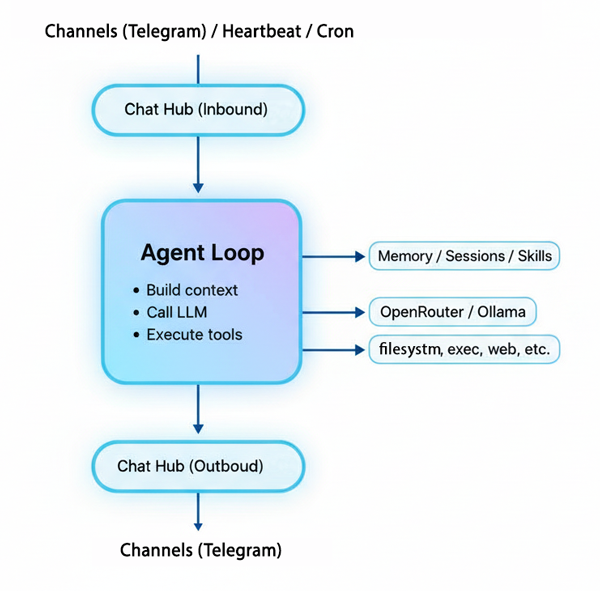
Notes: Channel refers to communication channels (e.g., Telegram, Discord, Slack, WhatsApp, etc.).
Features
16 Built-in Tools + MCP Extensions
The agent can take real actions — not just chat:
| Tool | What it does |
|---|---|
filesystem |
Read, write, list files |
exec |
Run shell commands |
web |
Fetch web pages and APIs |
web_search |
Search the web via DuckDuckGo |
| `mess |