README.md1 min read

Unlimited OCR Works




Welcome the Era of One-shot Long-horizon Parsing.
Release
- [2026/07/03] 🤝 Thanks to the Baidu Cloud team for their support. Our model is now available on Baidu Cloud.
- [2026/06/28] 🤝 Thanks to the vLLM community and Tianyu Guo for their support, our model now supports vLLM inference.
- [2026/06/24] 🤝 Thanks to AK for creating a demo for us. It is now available at Hugging Face Spaces.
- [2026/06/23] 📄 Our paper is now available on arXiv.
- [2026/06/23] 🤝 Thanks to the ModelScope community for their support. Our model is now available at ModelScope.
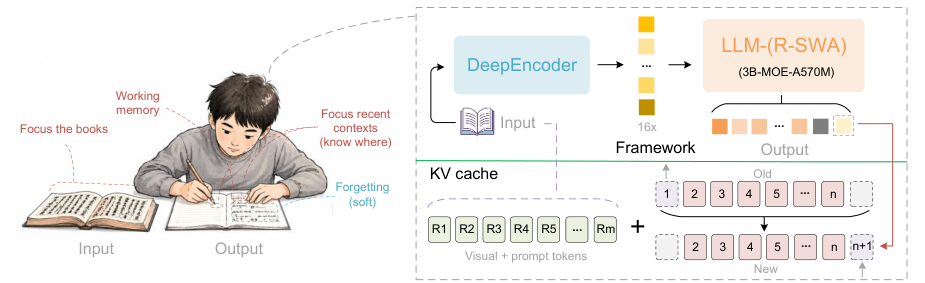
- [2026/06/22] 🚀 We present Unlimited-OCR, aiming to push Deepseek-OCR one step further.
Inference
Transformers
Inference using Huggingface transformers on NVIDIA GPUs. Requirements tested on python 3.12.3 + CUDA12.9:
torch==2.10.0
torchvision==0.25.0
transformers==4.57.1
Pillow==12.1.1
matplotlib==3.10.8
einops==0.8.2
addict==2.4.0
easydict==1.13
pymupdf==1.27.2.2
psutil==7.2.2
import os
import torch
from transformers import AutoModel, AutoTokenizer

model_name = 'baidu/Unlimited-OCR'

tokenizer = AutoTokenizer.from_pretrained(model_name, trust_remote_code=True)
model = AutoModel.from_pretrained(
    model_name,
    trust_remote_code=True,
    use_safetensors=True,
    torch_dtype=torch.bfloat16,
)
model = model.eval().cuda()

# ── Single image supports two configs: gundam or base ──
# gundam: base_size=1024, image_size=640, crop_mode=True
# base: base_size=1024, image_size=1024, crop_mode=False
model.infer(
    tokenizer,
    prompt='<image>document parsing.',
    image_file='your_image.jpg',
    output_path='your/output/dir',
    base_size=1024, image_size=640, crop_mode=True,
    max_length=32768,
    no_repeat_ngram_size=35, ngram_window=128,
    save_results=True,
)

# ── Multi page / PDF only uses base (image_size=1024) ──
model.infer_multi(
    tokenizer,
    prompt='<image>Multi page parsing.',
    image_files=['page1.png', 'page2.png', 'page3.png'],
    output_path='your/output/dir',
    image_size=1024,
    max_length=32768,
    no_repeat_ngram_size=35, ngram_window=1024,
    save_results=True,
)

# ── PDF (convert pages to images, then multi-page parsing) ──
import tempfile, fitz  # PyMuPDF

def pdf_to_images(pdf_path, dpi=300):
    doc = fitz.open(pdf_path)
    tmp_dir = tempfile.mkdtemp(prefix='pdf_ocr_')
    mat = fitz.Matrix(dpi / 72, dpi / 72)
    paths = []
    for i, page in enumerate(doc):
        out = os.path.join(tmp_dir, f'page_{i+1:04d}.png')
        page.get_pixmap(matrix=mat).save(out)