 Fusion
From rough idea to production code — automatically.
🏭 A software factory, run by a multi-agent orchestrator.
Describe what you want — a team of AI agents plans, builds, reviews, and ships it for you. Fusion is your software factory: an assembly line for code that runs across tasks, agents, missions, git, files, and worktrees, with any model, local or cloud.
runfusion.ai → · Docs · GitHub · npm · Discord
English · 简体中文 · 繁體中文 · Français · Español · 한국어





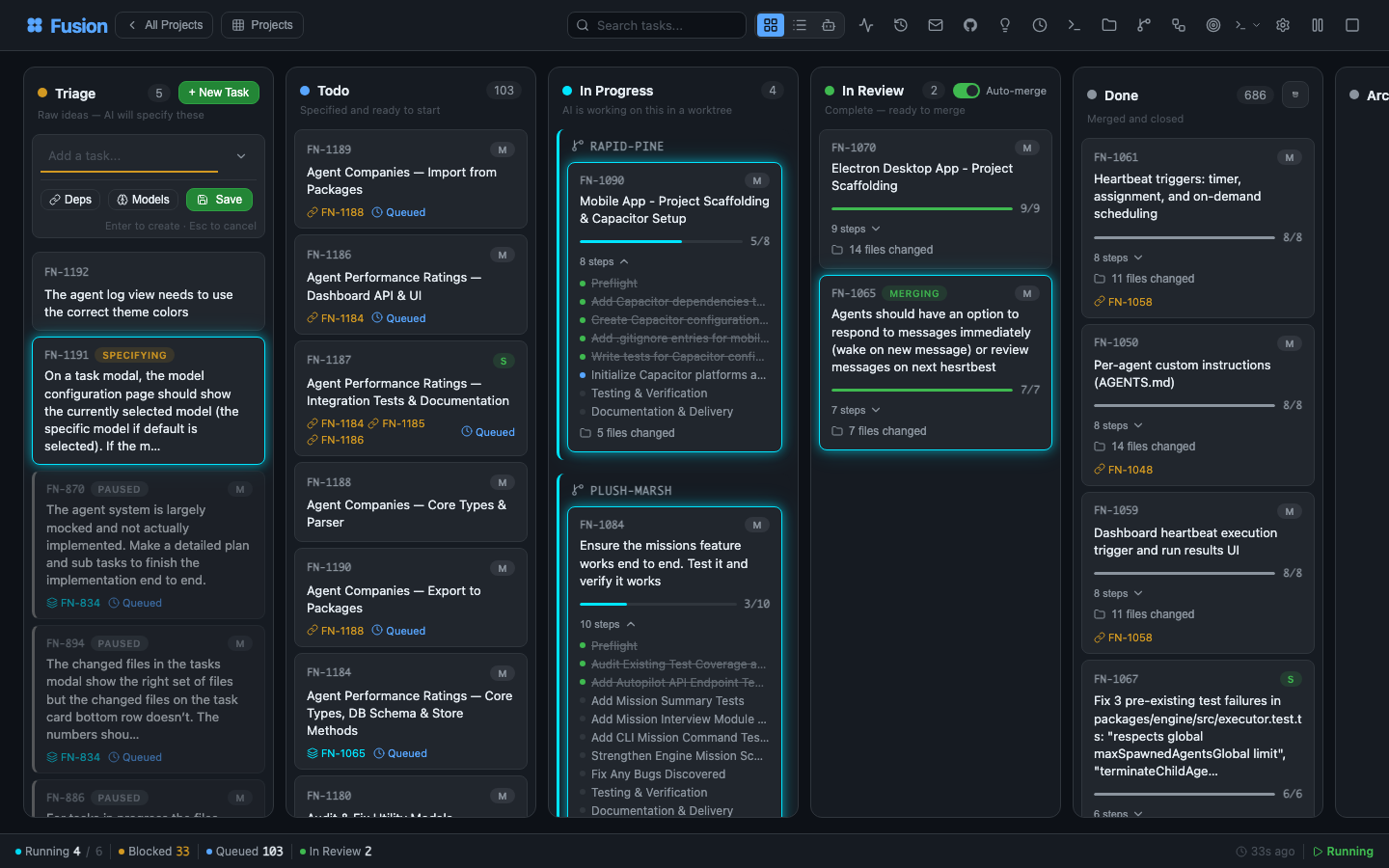
Your entire dev environment. On a single pane of glass.
Describe a task in plain language. A planning agent reads your project, understands context, and writes a full PROMPT.md plan — steps, file scope, acceptance criteria. Then Fusion plans, reviews, executes, and reviews again, in an isolated git worktree, with a human approval gate wherever you want one.
One board. Controlled from anywhere. Laptop, Mac mini, Linux server, cloud VM, phone — all connected.
Like Trello, but your tasks get specified, executed, and delivered by AI. Built on the great work of dustinbyrne/kb.
Quick start
Zero install, straight from npm:
npx runfusion.ai
That launches the dashboard. Subcommands forward through: npx runfusion.ai task create "fix X", npx runfusion.ai --help, etc. (Or verbosely: npx @runfusion/fusion dashboard.)
One-line installer (macOS & Linux — auto-picks Homebrew, falls back to npm):
curl -fsSL https://runfusion.ai/install.sh | sh
fusion dashboard
Homebrew (macOS & Linux):
brew install runfusion/fusion/fusion
fusion dashboard            # or: fn dashboard
Fully-qualified install auto-taps and, on Homebrew 6.0+, trusts only the Fusion formula. If you already ran brew tap runfusion/fusion and short-name install fails with “untrusted tap”, run brew trust --formula runfusion/fusion/fusion then brew install fusion.
npm global:
npm install -g @runfusion/fusion
fn dashboard                # or: fusion dashboard
From a clone (for development):
pnpm dev dashboard
Then click the Open: URL printed in the terminal. It embeds a bearer token
(http://localhost:4040/?token=fn_...) that the browser captures to
localStorage on first visit and reuses automatically thereafter. On the
server side, Fusion now persists the dashboard/daemon token in
~/.fusion/settings.json on first authenticated run and reuses it on later
starts unless you override it (--token, FUSION_DASHBOARD_TOKEN,
FUSION_DAEMON_TOKEN) or disable auth with --no-auth. See
CLI reference → fn dashboard → Authentication
for full precedence and reset/revocation options.
First-run setup
On first launch, Fusion