
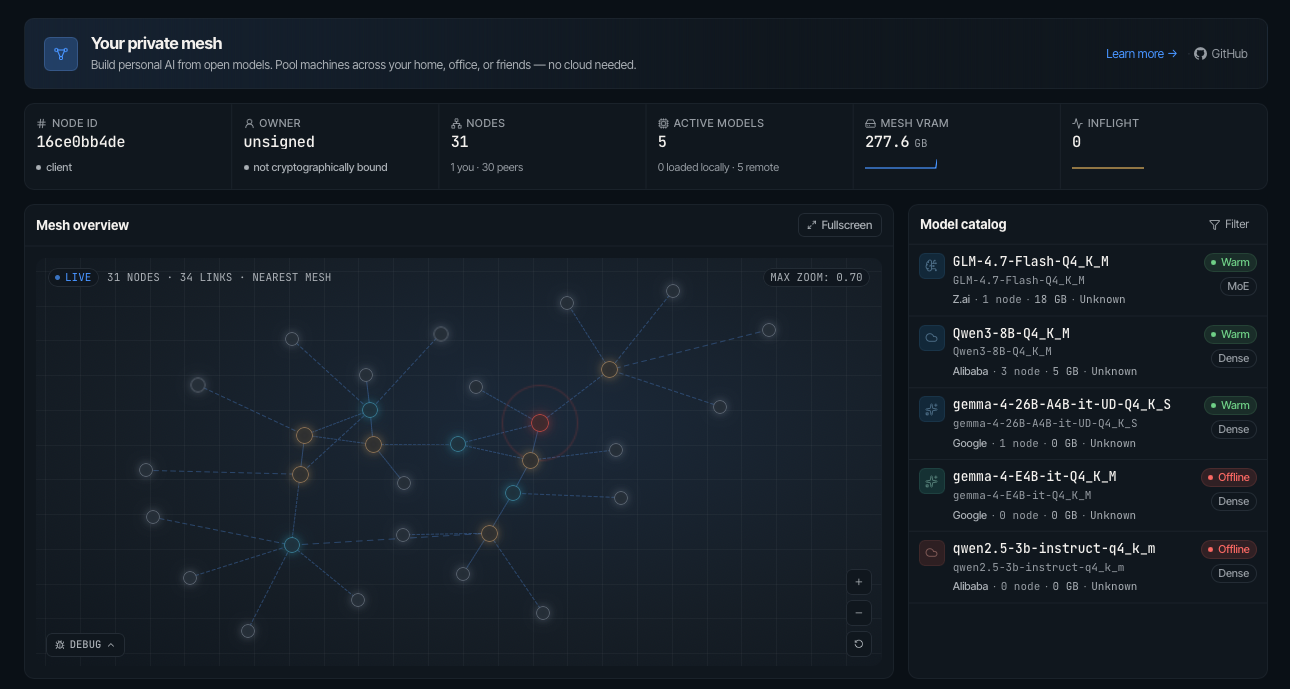
Mesh LLM pools GPUs and memory across machines and exposes the result as one
OpenAI-compatible API at http://localhost:9337/v1. Start one node, add more
nodes later, and let the mesh decide whether a model runs locally, routes to a
peer, or uses Skippy stage splits for models that are too large for one box.
Quick start
Install the latest release executable:
curl -fsSL https://raw.githubusercontent.com/Mesh-LLM/mesh-llm/main/install.sh | bash
On Windows, use PowerShell:
irm https://raw.githubusercontent.com/Mesh-LLM/mesh-llm/main/install.ps1 | iex
Finish setup:
mesh-llm setup
On Windows PowerShell, use mesh-llm.exe setup.
To remove an executable install later, preview the cleanup first:
mesh-llm uninstall --dry-run
mesh-llm uninstall --yes
Uninstall preserves ~/.mesh-llm configuration and identity data unless you
explicitly pass --purge-config.
Join the public mesh and start serving:
mesh-llm serve --auto
That command chooses a backend flavor, downloads a suitable model if needed,
joins the best discovered public mesh, starts the local API on port 9337, and
starts the web console on port 3131.
Check available models:
curl -s http://localhost:9337/v1/models | jq '.data[].id'
Send an OpenAI-compatible request:
curl http://localhost:9337/v1/chat/completions \
  -H "Content-Type: application/json" \
  -d '{"model":"GLM-4.7-Flash-Q4_K_M","messages":[{"role":"user","content":"hello"}]}'
For server deployments, add --headless to hide the web UI while keeping the
management API on the --console port:
mesh-llm serve --auto --headless
Pick the workflow you need
| Goal | Command | Full guide |
|---|---|---|
| Try the public mesh | mesh-llm serve --auto |
docs/MESHES.md |
| Start a private mesh | mesh-llm serve --model Qwen3-8B-Q4_K_M |
docs/MESHES.md |
| Publish your own mesh | mesh-llm serve --model Qwen3-8B-Q4_K_M --publish |
docs/MESHES.md |
| Join by invite token | mesh-llm serve --join <token> |
docs/MESHES.md |
| Run an API-only client | mesh-llm client --auto |
docs/MESHES.md |
| Run a big model with splits | mesh-llm serve --model hf://meshllm/<repo>@<rev> --split |
docs/SKIPPY_SPLITS.md |
| Attach a Flash-MoE SSD backend | mesh-llm serve with [[plugin]] name = "flash-moe" |
docs/plugins/flash-moe.md |
| Fan out one prompt to every model in the mesh | curl ... -d '{"model":"mesh", ...}' |
docs/design/MOA_GATEWAY.md |
| Use Goose, OpenCode, Claude Code, or Pi | mesh-llm goose, mesh-llm opencode, mesh-llm claude, mesh-llm pi |
docs/AGENTS.md |
| Build or contribute | just build |
CONTRIBUTING.md |
How the mesh works
- Single-machine fit first. If one node can host the full model, it serves the model locally without stage traffic.
- Mesh routing. Every node exposes the same
/v1API. Requests are routed by themodelfield to the peer that can serve that model. - Owner-control plane. Operator config and inventory actions use an
additive
mesh-llm-control/1lane with explicit endpoint bootstrap, while public mesh join, gossip, routing, and inference stay on the public mesh plane for mixed-version compatibility. - Skippy stage splits. Large dense models can load as package-backed layer stages. The coordinator plans contiguous layer ranges, starts downstream stages first, waits for readiness, then publishes the stage-0 route.
- Layer packages. Package repositories contain
model-package.jsonplus GGUF fragments so peers fetch only the pieces needed for their assigned stage. - **Public disc