README.md1 min read
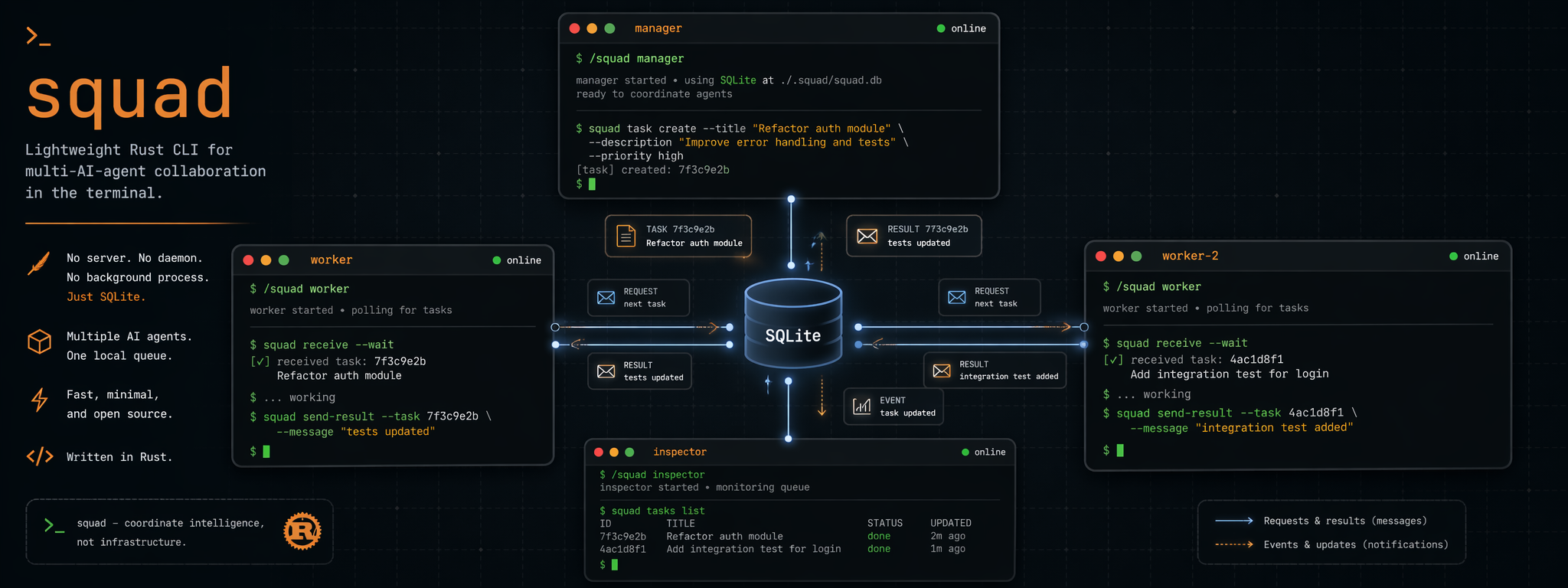
squad
Multi-AI-agent terminal collaboration via simple CLI commands.



squad lets multiple AI CLI agents communicate through shell commands + SQLite.
No daemon, no background processes — every command is a one-shot operation.
English | 简体中文
 |
 |
 |
 |
| Claude Code | Gemini CLI | Codex CLI | OpenCode |
claude |
gemini |
codex |
opencode |
One slash command. Multiple agents collaborating in real-time.
Assign a manager, spin up workers, add an inspector — each in its own terminal, communicating through SQLite.
Install
# Homebrew (macOS)
brew install mco-org/tap/squad

# Windows (GitHub Releases)
# 1. Download squad-x86_64-pc-windows-msvc.zip
# 2. Extract squad.exe to a folder like C:\Tools\squad
# 3. Add that folder to PATH

# Or download another prebuilt binary from GitHub Releases
# https://github.com/mco-org/squad/releases

# Or build from source
cargo install --git https://github.com/mco-org/squad.git
Quick Start
# Install /squad slash command for your AI tools
squad setup

# Initialize workspace in your project
squad init

# In any AI CLI terminal — just use the slash command
/squad manager      # terminal 1
/squad worker       # terminal 2
/squad inspector    # terminal 3
That's it. Each agent joins, reads its role instructions, and enters a work loop that checks for messages. The manager breaks down your goal and assigns tasks to workers.
Optional tmux Launcher
For Unix-like environments that already use Claude Code, this repo also ships an optional helper script:
scripts/squad-tmux-launch.sh /path/to/project --dry-run
It can:
- read project-local launcher config from
.squad/launcher.yaml - read a task brief from
.squad/run-task.md - generate manager / inspector prompt files under
.squad/quickstart/ - start a tiled
tmuxsession and inject/squadcommands into Claude panes - optionally create an isolated git worktree before launching agents
Requirements:
tmuxruby(used to parselauncher.yaml)- `claud